A scene that moves
You want a marker that glows, a ring that blooms where a signal fired, a chart that slides smoothly into a new asset instead of snapping. In almost every system that means reaching for an animation framework: a render loop, a clock you drive by hand, a pile of imperative state that lives beside your data and slowly drifts out of sync with it. Flux has none of that, and the reason is a single idea worth holding onto before anything else: every property is a signal. A constant, a data value and an animation are the same kind of thing, so there is no animation API to learn — you make a property move by giving it a signal that varies, exactly as you plot a value by giving it one.
This chapter settles into the two presentation planes Guide §8 named: the CANVAS plane, where a program shows things, and the TRANSITION plane, which interpolates the picture between two states your analysis already computed. Canvas runs on the frame: it may use screen space, wall-clock time and randomness, and it may read everything the analysis plane produced while being structurally unable to write back into it. By the end you will animate a radius three different ways with one property model, spawn a ring on a crossover, morph a chart when you switch assets — and understand why none of it can ever repaint a value. The formal statements live in the spec; here we build the intuition and link down.
Every property is a signal
Here is the whole design, in three lines that differ only in what you hand to r:
dot { at: (bar.i, close), r: 4 }                    // a constant radius
dot { at: (bar.i, close), r: 2 + norm(volume) * 8 } // a data-driven radius
dot { at: (bar.i, close), r: tween(2 -> 10, 400ms) }// an animated radius
Three programs, one property model, no separate animation framework to import — animation is a signal. The first radius never changes, the second tracks volume, the third eases from 2 to 10 over 400 ms — and to the language they are the same kind of thing in the same slot. There is no “make this animate” call, because animating a property is giving it a signal that varies.
And here is the analysis a scene decorates, rendered live on this page — the same engine, in your
browser, on WebGPU. Edit it: change the length, or add a second plot, and the lines recompute as
you type.
This island renders live in a WebGPU browser — edit the source on the left and it recompiles.
That EMA is a clean, connected line because the analysis renderer draws it. The CANVAS plane layers
motion on top of exactly this — and here is what that reads like: a dot tracing a series with a radius
that breathes on a throb, and, in screen.* space, a glowing dot with a ring that blooms every beat.
dot { at: (bar.i, ema(close, 20)), r: 4 + throb(0.7) * 3, fill: up, glow: 12 }dot { at: (screen.cx, screen.cy), r: 22 + throb(0.7) * 16, glow: 28, fill: up }
on every(1s) -> spawn ring { at: (screen.cx, screen.cy), r: 16 -> 110, opacity: 70% -> 0%, life: 1800ms }The animation model is real today — throb, spawn, life, every, and the whole
property-is-a-signal idea run in the engine, and the chart’s own intros and overlays already use them.
What is still sealed design is a polished stand-alone canvas island: a scene rendered on its own in an
ordinary page, with its own viewport-coordinate host, tick source and GPU context. Until that host
lands, the canvas verbs above are shown as designed code, while every live island on this site is
chart-hosted analysis — the RSI and 3-D chart on the landing and the MACD in
your first session, rendering with the real engine now.
A note on the samples. Flux has no expression-statements, so a bare expression is not a program. The lines marked
✗on this page are therefore expression fragments: they exist to show what the kind rules refuse, not what the parser accepts. Every unmarked line is a legal statement.
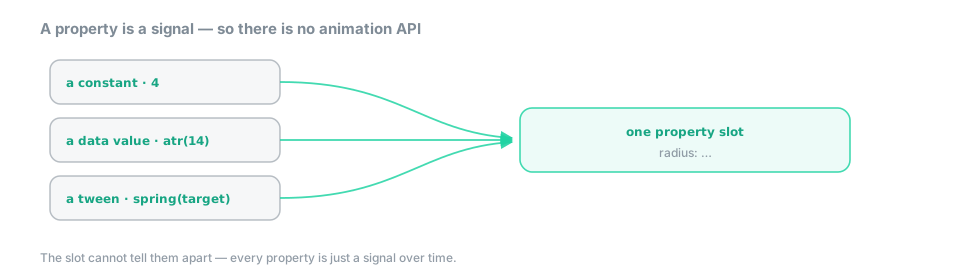 Figure — a constant, a data value and an animation flow into one property slot; the slot cannot tell them apart, so there is no animation API.
A canvas program organizes around four orthogonal axes: spaces (where a coordinate lives), signals (what a property is), events → actions (what interaction does), and composition (how elements are grouped and repeated). The rest of this chapter walks them in turn.
Where a coordinate lives: the spaces
A coordinate derives its axis from its kind. You never name an axis; you write a value, and the value’s kind decides where it lands.
| You write | The axis it lands on |
|---|---|
price |
the price axis |
time, bar.i (barindex) |
the time / ordinal x axis |
screen.cx, screen.w, … |
viewport pixels |
pane, ratio |
a sub-pane fraction |
z (depth) |
the depth axis — projected in 3-D, flattened in 2-D |
Mixing two spaces inside one coordinate is [ErrDim] at compile time. A geometrically incoherent
scene is not expressible — you cannot ask for a point that is partly a price and partly a volume,
because there is no such place on the chart:
dot  { at: (bar.i, close), r: 4 }                    // the time axis × the price axis
line { at: (bar.i, ema(close, 200)), w: screen.w, stroke: token.grid }
dot  { at: (bar.i, close + volume) }                 // ✗ [ErrDim] — price + volume: two axes, one coordinate
The one exception everyone needs — pinning a label eight pixels above a candle — is the composite
anchor. Written high + 8px inside a coordinate, it is a two-component coordinate constructor —
a data anchor plus a pixel offset — and not an arithmetic sum across sorts. The two components
keep their own axes and are never added to one another; the + is the constructor’s notation, not
the operator. The pixel part must be a const: a screen-derived offset like screen.h * 0.05
would make the whole position screen-dependent, and the position is one of the things that must stay
deterministic. display states the same rule from the
renderer’s side.
The signals that move things
Every animating property is a signal built from a small, closed palette. There are generators that manufacture a varying value, combinators that shape and blend them, and host facts the canvas is allowed to read because it lives on the presentation side of the firewall.
| Family | Members |
|---|---|
| Generators | tween(a -> b, d, ease) · sweep(a -> b, d) · wave(sin|tri|saw, amp, T) · spring(target) · noise(seed, v) · ramp · throb |
| Combinators | mix · lerp · clamp · norm · stagger · since · hold · pick · rand |
| Host facts | now() / clock:wall · screen.* · bar.isLast · chart.lastBar |
| The forming-bar reader | live(e) — display sinks only |
The generator spring ships in its single-argument form spring(target); an optional stiffness
spring(target, k) is designed, and lands as an additive second argument.
Every one of the host facts is canvas-only: reading it from analysis raises [ErrFirewall].
That includes randomness, seeded or not:
dot { at: (bar.i, close), r: 2 + 4 * rand() }   // ✓ a canvas prop may jitter, per frame
rand(1337)                                      // ✗ [ErrFirewall] in analysis — seeded or not, rand is presentation-only
Randomness is a presentation signal, and it stays on the presentation side of the wall — a seed
pins the sequence, but it does not move the generator across it. The same line splits the
forming unit: live(e) lets a display sink read the unit still being built — the forming bar, in
charting — but that value can never reach an alert, an assertion or a calculation; reading it there
is the whole point of the wall. Time and state has the full account of live() and clocks.
Interaction stays cosmetic
Interaction is written as events wired to actions. An event on the left, an arrow, an action on the right:
ema50 = ema(close, 50)
on click                    -> burst(40) ring { at: (bar.i, close), life: 2s }
on every(1 bar)             -> spawn ring { at: (bar.i, close), r: 6 -> 24, opacity: 100% -> 0%, life: 900ms }
on close cross_up ema50     -> flash
on switch(asset)            -> morph chart over 500ms
The event operand may be a boolean stream from analysis (close cross_up ema50), a timer
(every(1 bar), every(300ms), every(~2s) for a jittered period), or a pointer event
(hover, click, drag, enter, exit, move, wheel). The action may be a spawn (spawn,
burst(n), emit rate(r) — all drawn from a capped pool with a life:), a tween of a
property, a bounded effect (flash, bounce, pulse, shake), or a set.
Notice what interaction cannot do. It may spawn, tween, flash and set presentation properties, and that is the ceiling: it cannot change a computed value, and it cannot persist anything. The moment you need state that survives an event and decides what is displayed, you have left canvas for the APP plane — and the language makes you say so, rather than letting a click quietly mutate a Model behind the scenes. Guide §10 picks up there.
Making many things
Two constructs make many elements, and both are bounded by construction — which is what lets the compiler count the scene before it draws it, instead of discovering the count at 3 a.m. in production:
group  { dot { at: (bar.i, close), r: 3 } }             // transform / blend / clip a subtree
repeat 8 as i { dot { at: (bar.i, close), r: 2 + i } }  // instancing — `i` parameterizes the shape
for lvl in window(close, 5) -> dot { at: (bar.i, lvl) } // a comprehension over a BOUNDED collection
repeat takes a const count; for iterates a collection whose capacity is declared. To iterate over
the indices 0 … N−1 rather than over data, take them as a collection — vec.range(N) is the
vector of those indices, and the comprehension consumes it like any other:
step = atr(14)
for i in vec.range(5) -> dot { at: (bar.i, close + i * step), r: 3 }
The rule to remember is not that indices are unavailable — it is that the count must be const.
vec.range takes a literal, exactly as window and repeat do. A data-dependent count would make
the instance budget data-dependent, and the budget is precisely the thing that has to be known
before the first frame is drawn.
The primitives, and a scene as a value
The primitive set is closed and vetted — a script cannot invent a primitive, and therefore cannot smuggle markup, a URL or a raw byte buffer into the renderer:
dot · circle · ring · rect · square · triangle · poly · line · path
text · image · svg · sparkline · backdrop
They share one property model: at, size / r / w / h, rotate, fill, stroke, width,
opacity, glow, blend, z, life, color, trail, paintOrder. The model is the whole
vocabulary — there is no per-primitive dialect on top of it. A line is positioned with at and
sized with w / h, exactly as a dot is; it has no endpoint properties of its own.
A scene can also be a value, which is how a drawing overlay reaches a chart pane without the canvas plane and the app plane having to know about each other:
def overlayOf(m) = scene {
  line { at: (bar.i, m.anchor), w: screen.w, stroke: token.grid, width: 2 }
  for lvl in m.levels -> dot { at: (bar.i, lvl), r: 3, opacity: 60% }
}
scene{…} has kind ui, so it can be returned from a function and handed to a window like any other
value. That window is an island — a <div> the real engine paints inside an otherwise static
HTML page — and it is safe to embed even when its author is a stranger. Its visual richness —
background, border, radius, shadow, type — is a closed set of typed style props the host
validates and applies, never a raw CSS string the script hands over. The one injection surface a UI
language usually exposes is therefore not filtered but structurally absent, which is what lets a
stranger’s animated island render beside yours and touch none of the data your own logic depends on.
You never write a render loop
You never write a render loop, and you never optimize one. The scene compiles once, and the compiler classifies every signal and routes it to the cheapest place that can produce it:
| Class | Example | Route | Cost per frame |
|---|---|---|---|
| static | stroke: token.grid |
cached — never recomputed | 0 |
| per-bar | at: (bar.i, ema(close, 20)) |
pre-allocated buffers; identical shapes instanced | O(Δ bars) |
| per-frame, time-only | glow: throb(0.4) |
the host compositor | 0 JavaScript per frame |
That third row is the one that matters. The properties that move the most — a glow, a pulse, a parallax — are exactly the ones that cost nothing, because they never touch the language’s runtime at all. They run on the host compositor: scene graphics and text both render on WebGPU, which sidesteps the DOM layout cost that makes moving a thousand elements per frame expensive — text is an SDF glyph atlas, crisp at any zoom and DPR. The compiler already knows, per property, which stratum it belongs to; display draws the boundary in full.
Because the palette is closed, the whole scene is countable ahead of time. Emitters (spawn,
burst, emit rate) draw from a capped pool with a mandatory life:, so a particle storm has a
compile-time ceiling. Exceeding a scene budget — draw-list operations, instances, or worst-case GPU
work — is [ErrSceneBudget] at compile time. There is no runtime out-of-memory and no device
reset; the work is bounded, knowable and compile-counted, and aggregate pressure over budget is
rejected before it runs rather than dropped silently under load.
When the whole scene changes: transitions
Sometimes it is not a property that moves but the whole picture: you switch assets and want the candles to flow into their new places instead of blinking. That is the TRANSITION plane, and it has one defining sentence — a transition interpolates the rendering between two states that have already been computed. If both endpoints are values the analysis plane produced, interpolating between them cannot produce a new value, so a transition is cosmetic by definition, and no animation, however elaborate, can repaint a chart. It gets its own plane, with its own clock and its own rule, so that animation never ends up reading state it should not read or re-entering computations it should not re-enter.
A script has exactly five powers here, and no more:
// ① parameterize a built-in morph
on switch(asset) -> morph chart over 500ms { ease: inOutCubic ; stagger: 0.3 ; surplus: collapse }

// ② carry the transition of a custom representation (the `morph:` hook of its descriptor — a later rollout)

// ③ trigger a bounded effect on a signal
on close cross_up ema(close, 50) -> flash

// ④ animate the view
on click -> focus(view, at: (bar.i, close), zoom: 2.0, over: 600ms, ease: outBack(1.2))

// ⑤ replay history from the bar where a signal fired
replay from close cross_up ema(close, 200) over 8s
switch(asset) is a host event, not an analysis symbol: the current asset is a fact the host
owns, and the firewall forbids analysis from reading it. It arrives like any other presentation edge
(hover, click, enter), which is exactly why a transition can respond to it while an indicator
cannot. replay from takes a signal, not a step index — a bar index, in charting: the replay
begins at the unit where the condition fires and runs forward over the declared duration, which lets
you address a replay by what happened rather than by how far back it was. The start point is an analysis value the oracle
already contains — the transition plane discovers it, it never computes it.
Power ② — the per-representation morph: hook — is designed, but not yet an author key: the morph
controller is single-type (candle), and the descriptor the hook would hang from is reified in the
same rollout. Until then a custom representation animates through the built-in morph (①), which is
the path every built-in representation already takes.
The settle is in the oracle; the trajectory is not
This is the distinction that makes the plane safe, and it is worth being exact about:
| In the byte-identity oracle? | Why | |
|---|---|---|
| the settle value — where the transition lands | yes | it is analysis data (or a Model value); it is what the scene is once the animation ends |
the trajectory — how it gets there, t ∈ (0,1) |
no | it is per-frame, device-dependent, and observable by nobody but the eye |
Two consequences follow directly. First, prefers-reduced-motion changes nothing that matters.
The host applies it at the compositor by jumping straight to the settle state; since the settle is in
the oracle and the trajectory is not, the verdict — the numbers, the golden, the replay — is
identical either way. Second, a transition never leaks its progress into a decision. The plane
exposes only the terminal edge (Done), never the continuous progress, and that edge is
scheduled at a deterministic journal rank derived from the declared duration, not at the
wall-clock moment the animation happened to finish. Two clients, one animating and one with motion
reduced, journal the same edge at the same rank. This is the [TransSettle] invariant; see
display.
Why the progress is withheld. If a script could read
t = 0.63mid-animation and store it in a model, then the model — and any verdict computed from it — would depend on the frame rate, the device, and the GPU’s mood. Withholding the trajectory is not a limitation of the animation; it is what makes the animation free.
The upshot is a precise, honest form of determinism: every machine agrees on the numbers and on the scene — where each element lands and when the edge is journaled — while the pixels along the way are left to the GPU. Same numbers, same scene on every machine; not the same pixels.
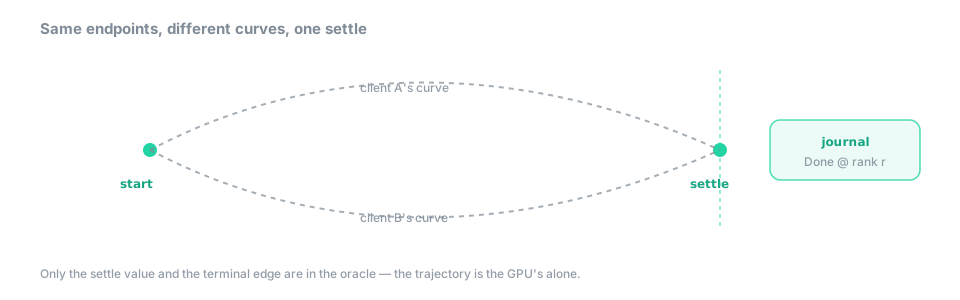 Figure — the settle value is in the oracle and the terminal edge is journaled at a fixed rank; the trajectory between the endpoints is the GPU’s business alone.
The descriptor, and the boundary with the native engine
Built-ins and scripts converge on one transition descriptor, so a custom representation animates
exactly the way a candle does: its fields fix the duration, the easing curve, the shape of the
stagger across elements, the surplus policy for elements with no counterpart on the other side, and
the cosmetic timings around the morph — with per-call overrides (over D, stagger, surplus:)
refining it at the point of use. The exact field list is the reference’s to hold; see the transition
descriptor →.
ease is a sort, not a variant — you can pass inOutCubic or cubicBezier(a,b,c,d) around, but
you cannot match on a curve and take it apart. That opacity is deliberate: a decomposable curve
would let a script re-parameterize time in a data-dependent way, and the boundedness of the animation
would go with it.
The heavy per-candle morph stays native — it is a hot path, and it is not the language’s job to re-implement it. Flux orchestrates: it fills in the descriptor once, and the native controller runs it. That split is why there is no performance cliff when you animate: the script does not run per frame, and the thing that does is the code that was already there — see the boundary with the native engine →.
What each plane may, and may not, do
The two tables below are the whole contract. Everything in a right-hand column raises a compile error
with an explanation — usually [ErrFirewall], and usually with the suggestion of the plane you
actually wanted.
Canvas:
| May | May not |
|---|---|
| read any analysis value | write any analysis value |
use now(), screen.*, unseeded rand |
let any of them reach a decision |
read the forming bar through live() |
feed live() into an alert, an assertion, or a calculation |
| spawn, tween, flash, set | persist, enable another script, reconfigure the app |
| toggle the visibility of its own output | touch anything else’s |
Transitions:
| May | May not |
|---|---|
| interpolate the rendering between two computed states | compute a state |
| read analysis values (to know where to land) | write an analysis value |
respond to a host edge (switch(asset), a click) |
read the wall clock into a Model |
| expose its terminal edge | expose its progress |
Read the two together and the shape of the plane is plain: a scene may be as alive as you like, and none of that life can ever change a number.
See also
- Guide §8 — The four planes — the firewall this chapter draws on, and where canvas and transitions sit in it.
- Guide §10 — Building an application — when interaction needs to remember something and canvas is no longer enough.
- Spec — Canvas — the reference semantics of the plane narrated above.
- Spec — Transitions — the plane that interpolates between two computed states.
- FDK — display — the retained scene, the two strata,
viz.*, panes and windows. - FDK — color — tokens, explicit colours, and the perceptual interpolation animated properties ride.
The formal rules →
Everything this chapter narrated is specified exactly in Canvas and Transitions (Spec):
- Every property is a signal — the canvas axiom →
- The four axes: spaces, the composite anchor, signals, events → actions, composition →
- The closed primitive set and the shared property model →
- The performance model: static / per-bar / per-frame routing and
[ErrSceneBudget]→- What canvas may and may not do →
- The five powers of a transition, and
replay from→- The settle vs the trajectory,
prefers-reduced-motionand[TransSettle]→- The transition descriptor and the
easesort →- The boundary with the native morph controller →