The CANVAS plane
The canvas plane is where a program shows things. It runs on the frame, it may use screen space, wall-clock time and randomness, and it may read everything the analysis plane computed — while being structurally unable to write back into it. This page specifies the plane: its axes, its signals, its closed set of primitives, its performance model, and the exact boundary of what it may and may not do. The one-way firewall that isolates it is owned by The four planes; the plane it hands off to when a picture must interpolate between two computed states is Transitions.
New here? Start with Guide §9 — A scene that moves →
It has one axiom, and the axiom is the whole design:
Every property is a signal. A constant, a data value and an animation are the same kind of thing. There is therefore no animation API — animating a property means giving it a signal that varies, exactly as plotting a value means giving it one that does.
dot { at: (bar.i, close), r: 4 }                    // a constant radius
dot { at: (bar.i, close), r: 2 + norm(volume) * 8 } // a data-driven radius
dot { at: (bar.i, close), r: tween(2 -> 10, 400ms) }// an animated radius
Three programs, one property model, no animation framework.
A note on the samples. Flux has no expression-statements, so a bare expression is not a program. The lines marked
✗on this page are therefore expression fragments: they exist to show what the kind rules refuse, not what the parser accepts. Every unmarked line is a legal statement.
The four axes
A canvas program is organized along four orthogonal axes: spaces (where a coordinate lives), signals (what a property is), events → actions (what interaction does), and composition (how elements are grouped and repeated).
1. Spaces — the coordinate derives its axis from its kind
| You write | The axis it lands on |
|---|---|
price |
the price axis |
time, bar.i (barindex) |
the time / ordinal x axis |
screen.cx, screen.w, … |
viewport pixels |
pane, ratio |
a sub-pane fraction |
z (depth) |
the depth axis — projected in 3-D, flattened in 2-D |
Mixing two spaces inside one coordinate is [ErrDim] at compile time. A geometrically
incoherent scene is not expressible.
dot  { at: (bar.i, close), r: 4 }                    // the time axis × the price axis
line { at: (bar.i, ema(close, 200)), w: screen.w, stroke: token.grid }
dot  { at: (bar.i, close + volume) }                 // ✗ [ErrDim] — price + volume: two axes, one coordinate
The exception that everyone needs — pinning a label eight pixels above a candle — is the
composite anchor. Written high + 8px inside a coordinate, it is a two-component coordinate
constructor — a data anchor plus a pixel offset — and not an arithmetic sum across sorts. The
two components keep their own axes and are never added to one another; the + is the constructor’s
notation, not the operator.
The pixel part must be a const. A screen-derived offset (screen.h * 0.05) would make the
whole position screen-dependent, and the position is one of the things that must stay
deterministic. This rule is stated from the renderer’s side, canonically, by
display.
2. Signals — the generators and the combinators
| Family | Members |
|---|---|
| Generators | tween(a -> b, d, ease) · sweep(a -> b, d) · wave(sin|tri|saw, amp, T) · spring(target) — optional stiffness spring(target, k) · noise(seed, v) · ramp · throb |
| Combinators | mix · lerp · clamp · norm · since · hold · pick · rand |
| Host facts | now() / clock:wall · screen.* · bar.isLast · chart.lastBar |
| The forming-bar reader | live(e) — display sinks only |
Every generator and host fact in this catalogue is canvas-only: reading one from analysis
raises [ErrFirewall]. Randomness draws that line in full — rand() and rand(seed) are both
per-frame presentation signals, so neither crosses the wall:
dot { at: (bar.i, close), r: 2 + rand() * 4 }   // ✓ presentation jitter — a canvas prop may wobble
jitter = rand(1337)   // ✗ [ErrFirewall] — analysis reads no presentation signal, seeded or not
The reason is the replay guarantee: an analysis value must recompute byte-identically on every
machine and every re-run, and a generator sampled on the frame has no per-bar meaning to replay.
A seed changes which wobble you get, not the fact that it is a wobble. The forming-bar reader
live(e) appears in this catalogue as a display-only sink; the full account of what “the forming
bar” means, together with clocks and now(), is owned by
Time and state.
3. Events → actions
ema50 = ema(close, 50)
on click                -> burst(40) ring { at: (bar.i, close), life: 2s }
on every(1 bar)         -> spawn ring { at: (bar.i, close), r: 6 -> 24, opacity: 100% -> 0%, life: 900ms }
on close cross_up ema50 -> flash
on switch(asset)        -> morph chart over 500ms
The event operand may be a boolean stream from analysis (close cross_up ema50), a timer
(every(1 bar), every(300ms), every(~2s) for a jittered period), or a pointer event
(hover, click, drag, enter, exit, move, wheel).
The action may be a spawn (spawn, burst(n), emit rate(r) — all drawn from a capped pool
with a life:), a tween of a property, a bounded effect (flash, bounce, pulse, shake), or
a set.
Interaction on this plane stays cosmetic: it may spawn, tween, flash, and set presentation properties. It cannot change a computed value, and it cannot persist anything. When you need state that survives an event and decides what is displayed, you have crossed into the App plane — and the language makes you say so.
4. Composition
group  { dot { at: (bar.i, close), r: 3 } }             // transform / blend / clip a subtree
repeat 8 as i { dot { at: (bar.i, close), r: 2 + i } }  // instancing — `i` parameterizes the shape
for lvl in window(close, 5) -> dot { at: (bar.i, lvl) } // a comprehension over a BOUNDED collection
repeat and for are the two ways to make many things. Both are bounded by construction —
a const count, or a collection whose capacity is declared — which is what makes the instance
budget computable at compile time rather than discovered at 3 a.m. in production.
To iterate over the indices 0 … N−1 rather than over data, take them as a collection:
vec.range(N) is the vector of those indices, and the comprehension consumes it like any other.
step = atr(14)
for i in vec.range(5) -> dot { at: (bar.i, close + i * step), r: 3 }
The rule to remember is not that indices are unavailable — it is that the count must be const.
vec.range takes a literal, exactly as window and repeat do. A data-dependent count would make
the instance budget data-dependent, and the budget is precisely the thing that has to be known
before the first frame is drawn.
The primitives
The set is closed and vetted — a script cannot invent a primitive, and therefore cannot smuggle markup, a URL or a raw byte buffer into the renderer:
dot · circle · ring · rect · square · triangle · poly · line · path
text · image · svg · sparkline · backdrop
They share one property model: at, size / r / w / h, rotate, fill, stroke,
width, opacity, glow, blend, z, life, color, trail, paintOrder, key. The model
is the whole vocabulary — there is no per-primitive dialect on top of it, and every entry in it is
a style prop: a closed, typed value (a token, a colour, a signal), never a raw string. A line is positioned
with at and sized with w / h, exactly as a dot is; it has no endpoint properties of its
own. Three rules complete the model:
- Every primitive except
backdroprequires a position —at: (x, y), orat: (y)with the y value alone, which pins x to the live bar. - A primitive carries
paintOrderorz, never both — paint order is 2-D layering,zis 3-D depth, and one element cannot claim a place in both regimes. keynames an element’s identity (a scalar or a string) for the retained diff: keyed elements keep their identity across reorders and recomputes, as specified in display.
The colour-bearing properties — tokens, explicit colours and the perceptual interpolation between them — are owned by color.
A scene can also be a value:
def overlayOf(m) = scene {
  line { at: (bar.i, m.anchor), w: screen.w, stroke: token.grid, width: 2 }
  for lvl in m.levels -> dot { at: (bar.i, lvl), r: 3, opacity: 60% }
}
scene{…} has kind ui, so it can be returned from a function and handed to a window — which is
how a drawing overlay reaches a chart pane without the canvas plane and the app plane having to
know about each other. The retained scene it lands in, its two strata, and the window it attaches
to are specified by display.
The performance model
You never write a render loop, and you never optimize one. The scene compiles once, and the compiler classifies every signal and routes it:
| Class | Example | Route | Cost per frame |
|---|---|---|---|
| static | stroke: token.grid |
cached — never recomputed | 0 |
| per-bar | at: (bar.i, ema(close, 20)) |
pre-allocated buffers; identical shapes instanced | O(Δ bars) |
| per-frame, time-only | glow: throb(0.4) |
the host compositor | 0 JavaScript per frame |
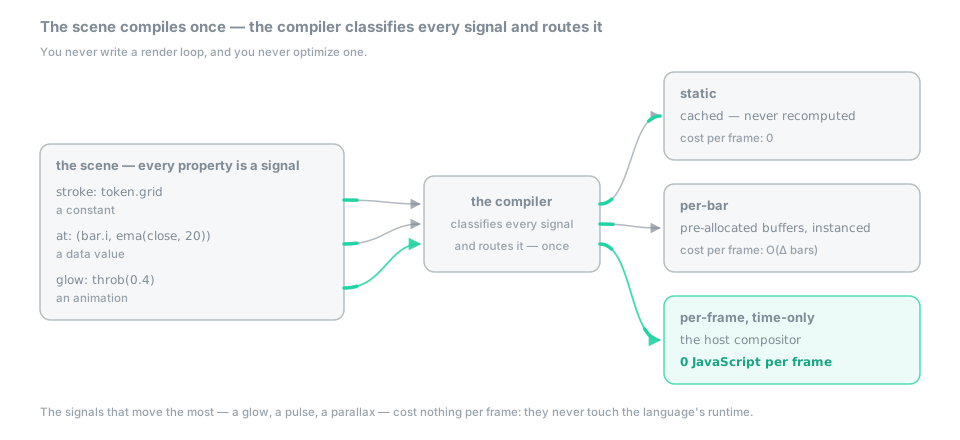 Figure — the scene compiles once: the compiler classifies every signal as static, per-bar, or per-frame time-only, and routes it to the cache, to pre-allocated buffers, or to the host compositor.
That third row is the one that matters. The properties that move the most — a glow, a pulse, a
parallax — are exactly the ones that cost nothing, because they never touch the language’s
runtime at all. The scene paints into an island — a <div> the engine owns inside an ordinary
page: scene graphics and text both render on WebGPU and sidestep DOM layout cost — text as an
SDF glyph atlas, crisp at any zoom and DPR. The retained scene these route into, and the compositor that
drives the time-only stratum, are owned by display.
Emitters (spawn, burst, emit rate) draw from a capped pool with a mandatory life:, so
a particle storm has a compile-time ceiling. Exceeding a scene budget — draw-list operations,
instances, or worst-case GPU work — is [ErrSceneBudget] at compile time. Work here is
compile-counted and bounded, not held at a frame rate: over-budget aggregate pressure is refused
before the first frame, and there is no runtime out-of-memory and no device reset.
What canvas may and may not do
| May | May not |
|---|---|
| read any analysis value | write any analysis value |
use now(), screen.*, rand |
let any of them reach a decision |
read the forming bar through live() |
feed live() into an alert, an assertion, or a calculation |
| spawn, tween, flash, set | persist, enable another script, reconfigure the app |
| toggle the visibility of its own output | touch anything else’s |
Everything in the right-hand column raises a compile error with an explanation — usually
[ErrFirewall], and usually with the suggestion of the plane you actually wanted.
See also
- Guide §9 — A scene that moves — the teaching path for this plane, one runnable idea at a time.
- Transitions — the plane that interpolates between two computed states.
- display — the retained scene, the two strata,
viz.*, panes and windows. - Time and state —
live(), clocks, and what “the forming bar” means. - App plane — when interaction needs to remember something.
- color — tokens, explicit colours, and the perceptual interpolation.